

TM 5-3805-264-13&P
0005
OPERATING CARGO COVER - Continued
b.
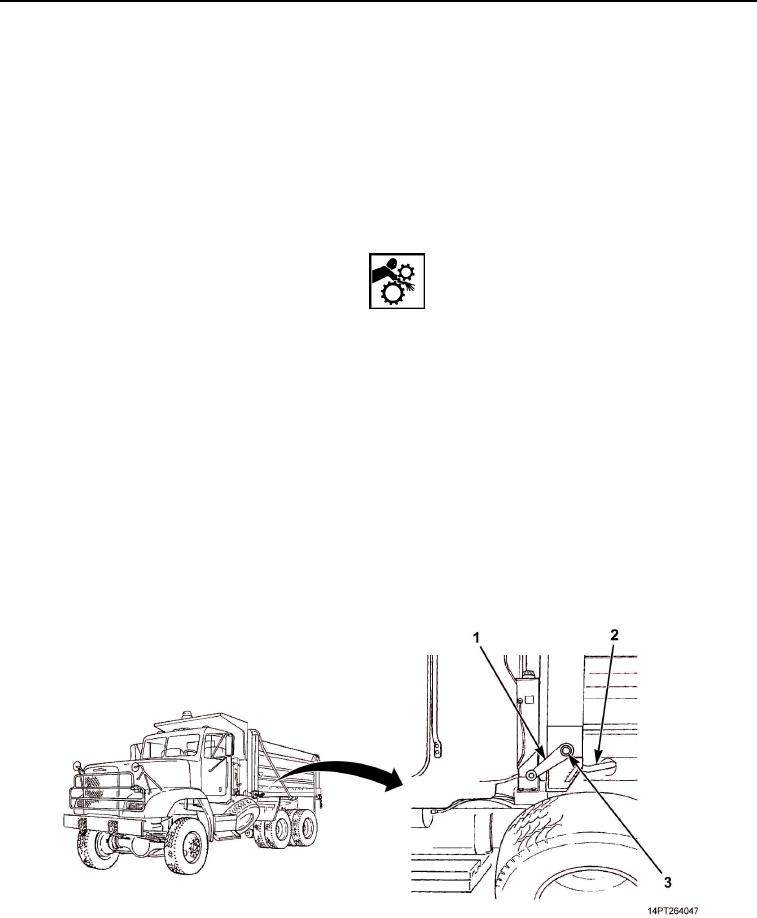
Remove crank handle (Figure 10, Item 1) from storage pouch in BII box.
c.
Install crank handle (Figure 10, Item 1) on crank shaft (Figure 10, Item 3). Turn handle clockwise to roll
up cargo cover. Stop at any time and mechanism will hold cover in place.
d.
Stop cranking when cargo cover is completely rolled up.
e.
Remove crank handle (Figure 10, Item 1) and stow.
2.
Covering Load
WARNING
DO NOT cover load with crank handle installed. Failure to comply may result in
personnel injury.
a.
Ensure that crank handle (Figure 10, Item 1) is NOT installed.
b.
Quickly move cargo cover control handle (Figure 10, Item 2) to farthest down BRAKE position.
CAUTION
DO NOT let go of cargo cover control handle until cargo cover is fully over load.
Handle provides braking action for cargo cover swing. Failure to comply may result in
damage to equipment.
c.
Carefully lift cargo cover control handle (Figure 10, Item 2) toward RELEASE position until cargo cover
begins to move. Keep hand on handle so that cover moves slowly. If cargo cover moves too fast,
move handle down slightly to apply brakes.
d.
When cargo cover is fully over load, release cargo cover control handle (Figure 10, Item 2). Handle will
return to top LOCK position.
Figure 10. Crank and Cargo Cover Components.
03/15/2011Rel(1.10)root(opusualwp)wpno(O1000226413)